, Odisha Repair - AC, Refrigerator & Home Appliances Repair Service in Bhubaneswar , AC, Refrigerator, Washing Machine & Microwave Service Centre Near By In Bhubaneswar
A step-by-step guide on how to troubleshoot common laptop issues yourself before deciding to repair or replace your laptop. Covers software issues, hardware failures, etc.

In today’s digital age, laptops have become an essential tool for both personal and professional use. However, like any electronic device, laptops can encounter various issues that hinder their performance and functionality. Before rushing to repair or replace your laptop, it is crucial to understand the importance of troubleshooting. This step-by-step guide aims to empower you with the knowledge and techniques to identify and resolve common laptop issues yourself. By troubleshooting software and hardware problems, you can potentially save time and money, while also gaining a better understanding of your laptop’s inner workings. So, let’s delve into the world of laptop troubleshooting, covering everything from software issues to hardware problems, allowing you to make informed decisions about repair or replacement.

If you need any professional repair service engineer from our all brand Laptop Service Centre in Bhubaneswar please call : 08093011080

, Odisha Repair - AC, Refrigerator & Home Appliances Repair Service in Bhubaneswar , AC, Refrigerator, Washing Machine & Microwave Service Centre Near By In Bhubaneswar

1. Introduction: The importance of troubleshooting laptop issues before repair or replacement


1.1 Why troubleshooting laptop issues is crucial

We’ve all been there – your laptop starts acting up, and your first instinct is to panic and rush to the nearest repair shop. But before you drain your wallet on costly repairs or invest in a shiny new laptop, it’s essential to troubleshoot the issues yourself. Troubleshooting allows you to identify and potentially fix the problem without spending a fortune.

1.2 Advantages of troubleshooting before repair or replacement

There are several advantages to troubleshooting laptop issues on your own before deciding to repair or replace. Firstly, it can save you both time and money. Many common laptop problems can be resolved with a little know-how and some basic tools, sparing you from the expense of professional repairs or purchasing a new device.

Secondly, troubleshooting empowers you to become more tech-savvy and independent. Learning to troubleshoot common laptop issues not only boosts your confidence in handling technology but also equips you with valuable skills that can be applied to various devices in the future.

So, before you bid farewell to your beloved laptop or reluctantly hand it over to a repair person, let’s dive into the world of troubleshooting and see what we can do!

2. Understanding Common Software Issues and Troubleshooting Methods


2.1 Overview of common software issues in laptops

Software problems are like those pesky little bugs that somehow find their way into our laptops. They can range from freezing screens and random error messages to sluggish performance and software crashes. Common software issues include malware infections, outdated drivers, incompatible software, and corrupt system files.

2.2 Step-by-step guide to troubleshooting software problems

When it comes to software issues, a systematic approach can work wonders. Start by running a thorough antivirus scan to weed out any potential malware. Then, update your drivers and software to the latest versions, ensuring compatibility and improved stability. If the problem persists, try restoring your system to an earlier date or reinstalling problematic software.

2.3 Utilizing diagnostic tools for software issue identification

Sometimes, software issues can be elusive, like that one sock that always goes missing in the laundry. In such cases, diagnostic tools can come to the rescue. Utilize built-in Windows tools like Task Manager, Event Viewer, or Performance Monitor to track down the misbehaving software or process causing trouble. These tools provide valuable insights and clues for effective problem-solving.

3. Identifying and Resolving Hardware Problems on Your Laptop


3.1 Common hardware problems encountered in laptops

Hardware problems can be a bit trickier to troubleshoot, but fear not – we’ll guide you through the process. Common hardware issues in laptops include overheating, faulty hard drives, malfunctioning keyboards, and unresponsive touchpads. These problems can lead to frequent shutdowns, data loss, or an overall frustrating user experience.

3.2 Troubleshooting hardware issues through physical inspection

Sometimes, the key to solving hardware problems is right in front of us – quite literally. Perform a physical inspection of your laptop, checking for loose connections, damaged cables, or blocked ventilation. Cleaning out dust from the vents and fan can also help alleviate overheating issues. Simple steps like these can often fix hardware woes without professional intervention.

3.3 Diagnosing and replacing faulty hardware components

If the hardware issue persists after your physical inspection, it may be time to face the dreaded truth – a faulty component. Identifying the culprit can be done through hardware diagnostic tests or trial-and-error by swapping out suspected components with known working ones. Whether it’s a faulty RAM stick or a worn-out battery, replacing the problematic hardware can breathe new life into your laptop.

4. Additional Tips for Diagnosing and Troubleshooting Laptop Issues


4.1 Understanding the importance of thorough troubleshooting

When it comes to troubleshooting laptop issues, thoroughness is key. Don’t settle for quick fixes or surface-level solutions. Take the time to investigate the root cause of the problem, as addressing the underlying issue ensures a more reliable and long-lasting solution.

4.2 Tips and tricks for efficient problem diagnosis

Efficiency is the name of the game in the world of troubleshooting. Save yourself time and energy by keeping your laptop’s drivers and software up to date. Additionally, create regular backups of your important files to protect against potential data loss during the troubleshooting process. And remember, Googling the problem and seeking advice from online forums can often yield helpful insights and solutions.

4.3 Advanced troubleshooting techniques for complex issues

For those really stubborn and complex issues that refuse to bow down to your troubleshooting prowess, don’t despair. Advanced troubleshooting techniques, such as booting into Safe Mode, disabling startup programs, or using system restore points, can provide a lifeline. These methods allow you to isolate and narrow down the problem, putting you on the path to victory.

Now armed with this step-by-step guide and a sprinkle of wit and determination, you’re ready to tackle those laptop issues head-on. May the troubleshooting force be with you!. Conclusion: Making an Informed Decision

8.1 Reflecting on the troubleshooting process and its outcomes


8.2 Considering personal preferences and needs


8.3 Final thoughts on repairing or replacing your laptop


5. Effective Strategies for Preventing Future Laptop Problems


5.1 Importance of regular maintenance and updates

Laptops, just like any other device, require regular maintenance to keep them running smoothly. This means performing routine tasks such as cleaning the keyboard, clearing out unnecessary files, and updating software and drivers. Regular maintenance not only improves performance but can also prevent potential issues from arising in the first place. So, put on your cleaning gloves and get ready to show your laptop some love!

5.2 Best practices for safe usage and handling of laptops

We’ve all been there – balancing our laptop on the edge of a table or throwing it into our bags without a care in the world. But if you want to prevent those annoying hardware problems, it’s important to handle your laptop with care. Avoid placing it on uneven surfaces, protect it from liquid spills, and never carry it by the screen. Treat your laptop like the delicate creature it is (but don’t go as far as naming it, that might be a tad too much).

5.3 Installing security software for protection against threats

Just like a knight in shining armor, security software can protect your laptop from the nasty cyber threats lurking in the depths of the internet. Install a reliable antivirus program, enable your firewall, and keep your software up to date. By doing so, you’ll be giving yourself some much-needed peace of mind and ensuring that your laptop remains a safe haven for your precious files.

6. When to Consider Repairing Your Laptop Yourself and When to Seek Professional Help


6.1 Assessing your own technical skills and capabilities

Before you don your invisible superhero cape and attempt to fix your laptop yourself, it’s important to honestly assess your technical skills. If you have experience tinkering with electronics and feel confident in your abilities, then by all means, give it a shot! However, if the extent of your technical expertise is knowing how to turn your laptop on and off, it might be best to leave it to the professionals.

6.2 Factors to consider before attempting self-repair

While it may be tempting to dive headfirst into DIY laptop repair, there are a few factors to consider before taking the plunge. Do you have the necessary tools and resources? Do you have the time and patience to troubleshoot and potentially make things worse? And most importantly, do you have a backup plan in case everything goes haywire? It’s always good to have a Plan B, even if it involves crying into a tub of ice cream.

6.3 Recognizing instances where professional assistance is necessary

Let’s face it, some laptop problems are just too big for us mere mortals to handle. If your laptop is making strange noises, emitting smoke, or has suddenly developed a mind of its own, it’s probably time to wave the white flag and seek professional help. Sometimes, it’s best to let the experts work their magic and save us from any potential disasters. After all, they didn’t spend years honing their skills for nothing!

7. Evaluating the Cost and Benefits of Repairing vs. Replacing Your Laptop


7.1 Weighing the financial implications of repair and replacement

When it comes to repairing or replacing your laptop, the almighty dollar (or whatever currency you use) plays a significant role. Consider the cost of repairs versus the price of a new laptop. Sometimes, a small repair may be more cost-effective, while in other cases, investing in a shiny new laptop might be the way to go. Crunch those numbers and make sure you’re making a decision that won’t leave you crying into your empty wallet.

7.2 Analyzing the potential longevity and performance of repaired laptops

Ah, the age-old question of whether repairing a laptop will give it a new lease on life and extend its longevity. While repairs can certainly breathe new life into your trusty companion, it’s essential to assess the overall performance and potential future issues. If your laptop is on its last legs and repairs are just a temporary fix, then it might be time to let it retire gracefully and embrace the wonders of a newer, faster model.

7.3 Considering the value of investing in a new laptop

The allure of a shiny new laptop can be hard to resist. It’s like finding a pot of gold at the end of a rainbow (minus the leprechaun and lucky charms, unfortunately). Investing in a new laptop means getting the latest technology, improved performance, and potentially longer support from manufacturers. Just think of all the amazing things you could accomplish with a brand new laptop by your side. The possibilities are endless!

8. Conclusion: Making an Informed Decision


8.1 Reflecting on the troubleshooting process and its outcomes

Congratulations, you’ve made it through the troubleshooting journey! Take a moment to reflect on all the steps you’ve taken and the outcomes you’ve achieved. Whether you were able to fix your laptop yourself or realized it was time to move on, give yourself a pat on the back for being proactive and resourceful. You’re the MacGyver of laptops!

8.2 Considering personal preferences and needs

When it comes to laptops, personal preferences and needs play a big role in the decision-making process. Consider factors such as the laptop’s purpose, your budget, and the features that are important to you. Do you need it for gaming? Video editing? Or just casual Netflix binging? Let your personal touch guide you towards the decision that best suits your lifestyle and needs.

8.3 Final thoughts on repairing or replacing your laptop

In the end, the choice between repairing or replacing your laptop is a personal one. There is no one-size-fits-all answer. Whether you decide to give your faithful companion another chance at life or venture into the world of shiny new gadgets, trust your instincts and make the decision that feels right for you. And remember, no matter what path you choose, there’s always a laptop out there waiting to be your next partner in crime. Happy troubleshooting!

9. Conclusion: Empowering Yourself to Troubleshoot and Make Informed Decisions for Your Laptop.

In conclusion, troubleshooting laptop issues before considering repair or replacement is a valuable skill that can save you time, money, and frustration. By understanding common software and hardware problems, utilizing diagnostic tools, and following step-by-step troubleshooting methods, you can effectively address many laptop issues yourself. Additionally, practicing proper maintenance, implementing preventive measures, and knowing when to seek professional help will contribute to the longevity and optimal performance of your laptop. By taking control of the troubleshooting process, you empower yourself to make informed decisions about whether to repair or replace your laptop, ensuring that you get the most out of your device while minimizing unnecessary costs.


Home Repair Services | Laptop & Desktop Computer Repair service Centre in Bhubaneswar

HP, Dell, Acer, Lenovo, Asus, LG, Samsung, Toshiba, and Apple Best Buy Laptop Repair Service Centre at Your Doorstep in Bhubaneswar


Dell Laptop Repair Services

Dell laptops are known for their durability and performance. When seeking repair services for Dell laptops in Bhubaneswar, it is important to find a provider with experience in handling the specific technicalities of Dell laptops, including hardware and software issues.

Dell Laptop Repair Services in Bhubaneshwar.

Find ✓Dell Laptop Repair Shop, ✓Dell Laptop Repairing Stores, ✓Dell Laptop Repair & Services, ✓Dell Laptop Service Centre

HP Laptop Repair Services

HP is a popular laptop brand, and its repair requirements can vary from model to model. Look for a repair service in Bhubaneswar that has the expertise to handle a wide range of HP laptop issues, from motherboard repairs to keyboard replacements.

HP Laptop Repair Services in Bhubaneshwar.

Find ✓HP Laptop Repair Shop, ✓HP Laptop Repairing Stores, ✓HP Laptop Repair & Services, ✓HP Laptop Service Centre

Lenovo Laptop Repair Services

Lenovo laptops are known for their sleek design and robust performance. Whether it’s a screen replacement or a software malfunction, a reliable repair service in Bhubaneswar should be able to address all Lenovo laptop repair needs.

Lenovo Laptop Repair Services in Bhubaneshwar.

Find ✓Lenovo Laptop Repair Shop, ✓Lenovo Laptop Repairing Stores, ✓Lenovo Laptop Repair & Services, ✓Lenovo Laptop Service Centre

Acer laptop Repair Services

Our Acer repair experts can get your laptop back up and running lightning fast—without the hassle—whether you need a screen repair, battery replacement, or general checkup. Acer service center, provides top quality repair services Acer laptops and Acer notebooks. Acer service center provide you with comprehensive Acer laptop repair in Bhubaneswar.  Worried about quality? Our experts are trained to repair Acer laptops using top-quality parts.

Acer Laptop Repair Services in Bhubaneshwar.

Find ✓Acer Laptop Repair Shop, ✓Acer Laptop Repairing Stores, ✓Acer Laptop Repair & Services, ✓Acer Laptop Service Centre

Asus Laptop Repair Services

ASUS laptops are renowned for their reliability. Asus along with Gigabyte are most reliable motherboard manufacturers. While other laptop manufacturers buy that important part from others. But occasional issues can still arise. By following the troubleshooting steps mentioned above, you can address common problems such as slow performance, battery drain, driver errors, and overheating.

Asus Laptop Repair Services in Bhubaneshwar.

Find ✓Asus Laptop Repair Shop, ✓Asus Laptop Repairing Stores, ✓Asus Laptop Repair & Services, ✓Asus Laptop Service Centre

LG Laptop Repair Services

LG Computers/Laptops Service Center in Bhubaneswar. Call us 08093011080 for best OS installation and Screen Repair & Replacement anywhere in Bhubaneswar. Customer care support is absolute easy to reach as our service center is offering repair all models of LG laptops across Bhubaneswar at your doorstep .

LG Laptop Repair Services in Bhubaneshwar.

Find ✓LG Laptop Repair Shop, ✓LG Laptop Repairing Stores, ✓Laptop Repair & Services, ✓LG Laptop Service Centre

Samsung Laptop Repair Services

Samsung laptop repair & services in Bhubaneswar at your doorstep. Get Samsung laptop service center and get laptop repairservice centers, technician service at your doorstep in Bhubaneswar. We deal with only genuine parts and accessories. all us 08093011080 for best OS installation and Screen Repair & Replacement anywhere in Bhubaneswar. 

Samsung Laptop Repair Services in Bhubaneshwar.

Find ✓Samsung Laptop Repair Shop, ✓Samsung Laptop Repairing Stores, ✓Samsung Laptop Repair & Services, ✓Samsung Laptop Service Centre, ✓Samsung Notebook Repairs, ✓Samsung Laptop Screen Repairs, ✓Samsung Laptop Battery Replacement

Toshiba Laptop Repair Services

Toshiba Service Center strive to provide high quality service at affordable price. Complete Toshiba Laptop repair solutions are provide from the Experienced Laptop Service Technician at your doorstep in Bhubaneswar. Onsite Toshiba Laptop Repair Service Center at your Doorstep in Near Me at Bhubaneswar. All Toshiba Repairs come with same day service and 6 months warranty. Call us 08093011080 for best OS installation and Screen Repair & Replacement anywhere in Bhubaneswar. 

Toshiba Laptop Repair Services in Bhubaneshwar.

Find ✓Toshiba Laptop Repair Shop, ✓Toshiba Laptop Repairing Stores, ✓Toshiba Laptop Repair & Services, ✓Toshiba Laptop Service Centre

Sony Vaio Laptop Repair Services

Sony Vaio Laptop Repair Services in Bhubaneshwar.

Find ✓Sony Vaio Laptop Repair Shop, ✓Sony Laptop Repairing Stores, ✓Sony Vaio Laptop Battery, ✓Sony Vaio Laptop Sreen Repair, ✓Sony Vaio Laptop Motherboard Issues  Repair, ✓Sony Vaio Laptop Repair & Services, ✓Sony Vaio Laptop Service Centre

Apple Macbook Laptop Repair Services

Apple Macbook Laptop Repair Services in Bhubaneshwar.

Find ✓Apple Macbook Laptop Repair Shop, ✓Apple Laptop Repairing Stores, ✓Apple Macbook Laptop Repair & Services, ✓Apple Macbook Laptop Service Centre


FAQ


1. Can I troubleshoot software issues on my laptop without any technical knowledge?

Answer: Yes, you can troubleshoot software issues on your laptop even if you don’t have extensive technical knowledge. This article provides a step-by-step guide and tips for troubleshooting common software problems. By following the instructions and utilizing diagnostic tools, you can effectively identify and resolve software issues on your laptop.

2. How do I know if a hardware problem on my laptop requires professional repair?

Answer: While troubleshooting hardware problems, it’s important to assess your own technical skills and capabilities. If the issue involves complex components or requires advanced repair techniques, it may be best to seek professional help. Additionally, if your laptop is under warranty, it is advisable to consult the manufacturer or authorized service center to avoid voiding the warranty.

3. Should I repair or replace my laptop if I encounter frequent issues?

Answer: The decision to repair or replace your laptop depends on various factors such as the extent and cost of repairs, the age of the laptop, and your personal preferences. If the cost of repairs is significant and the laptop is outdated, it might be more cost-effective and beneficial to invest in a new laptop. However, if the repairs are minor and the laptop meets your current needs, repairing it can be a viable option. Consider evaluating the cost and benefits of repair versus replacement to make an informed decision.

4. How can I prevent future laptop problems?

Answer: Preventing future laptop problems is possible through regular maintenance and adopting best practices. Keep your laptop up to date with software updates and security patches, use reputable antivirus software, and practice safe browsing habits. Additionally, handle your laptop with care, avoid exposing it to extreme temperatures, and be mindful of liquids near the device. Regularly cleaning the laptop’s vents and ensuring proper airflow can also help prevent overheating issues.


Tags: LAPTOP Computer service centre number, LAPTOP customer care number, LAPTOP LG Gram service centre near me, LAPTOP Battery, Laptop care Bhubaneswar, Laptop Repair Mechanic, Laptop repair near me, LAPTOP repair service centre in Bhubaneswar, LAPTOP Screen Repair, LAPTOP service centre in Bhubaneswar, Laptop service Center KIIT Square Patia, Laptop service center phone number, LAPTOP service centre bhubaneswar contact number, LAPTOP service centre in Bhubaneswar Bapuji Nagar, LAPTOP service centre in Bhubaneswar KIIT Square Patia, LAPTOP service centre in Bhubaneswar Sahid Nagar, LAPTOP service centre,

HP Laptop Repair Service Centre, Lenovo Laptop Repair Service Centre, Dell Notebook Laptop Repair Service Centre, Asus Laptop Repair Service Centre, Acer Laptop Repair Service Centre, LG Gram Laptop Repair Service Centre, Toshiba Laptop Repair Service Centre, Sony Vaio Laptop Repair Service Centre, Apple Macbook Laptop Repair Service Centre Bhubaneswar

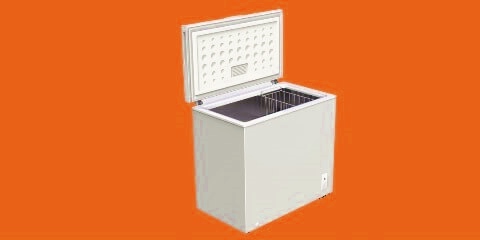
Deep Freezer Service Centre in Bhubaneswar – 8339003300

Get Refrigerator & Deep Freezer repair service in Bhubaneswar, Odisha near you within 60 minutes, with a 90-day post-repair guarantee and protection against damages up to INR 10,000. Odisha Repair Freezer Service Centre provides background-verified & trained refrigerator repair experts who are 4.5+ rated and promise on-time delivery at your convenience. Get genuine spare parts for your refrigerator at fixed prices with flat labour charges of Rs. 349. Odisha Repair Freezer Service Centre will help you connect with the best Refrigerator and Deep Freezer repair services to cater to your needs, right from the comfort of your home.

Deep Freezer Repair In Bhubaneswar

Odisha Repair Freezer Service Centre provides you to the best and highest level quality of services to repair deep freezer. Freezers offer most significant and savings, are professionals can quickly identify the problem, ensuring food is kept at the appropriate temperature and maintaining your food. However, deep freezer must be performed with the greatest care and safety to your food. Handling them without adequate care and safety could have fatal. Odisha Repair Freezer Service Centre is a best service provider that offers Quality In Time Service and affordable in comparison to the deep freezer repair service charges.

, Odisha Repair - AC, Refrigerator & Home Appliances Repair Service in Bhubaneswar , AC, Refrigerator, Washing Machine & Microwave Service Centre Near By In Bhubaneswar
Repair Refrigerator near me, How To Repair Refrigerator Not Cooling, Refrigerator Repair Troubleshooting,
How To Repair Refrigerator Compressor, Freezer Repair Cost, Commercial Refrigeration Repair, Deep Freezer Repair Service Centre

Deep Freezer & Refrigerator Repair Service in Bhubaneswar

Call and Book A Quality Refrigerator & Deep Freezer Repair Service near you in Bhubaneswar, Odisha just in 60 mins.

  • Background Verified Technician
  • ISO Verified Company
  • Guaranteed Satisfaction or Free re-service*
  • Professional Experts
  • Just in 60 Minute Service
  • Low Service Charges

We are providing services for all deep freezer repair services, such as, chest deep freezer repair services, drawer deep freezer repair and services, upright deep freezer repair and services, portable deep freezer repair and services, deep freezer installation services, deep freezer door does not open repair service, deep freezer repair services, sparking in side deep freezer repair service, It’s cycling too often, Ice buildup in freezer, It’s leaking water.

We Provide Deep Freezer Repair Services in Bhubaneswar in Just 60 Minutes – Book Now. Dial: 08339003300

  • Deep Freezer Repair Services
  • Chest Deep Freezer Repair Services
  • Drawer Deep Freezer Repair Services
  • Upright Deep Freezer Repair Services
  • Portable Deep Freezer Repair Services
  • Deep Freezer Installation Services
  • Deep Freezer Door Does Not Open Repair

Chest Deep Freezer Repair

, Odisha Repair - AC, Refrigerator & Home Appliances Repair Service in Bhubaneswar , AC, Refrigerator, Washing Machine & Microwave Service Centre Near By In Bhubaneswar
Chest Deep Freezer Repair service in Bhubaneswar Odisha

‘Odisha Repair Services is one of it’s kind best service provider that offers you a good quality of service of chest deep freezer repair services, our professional is well experienced to repair all type of deep freezers, so just book now and get quick response from our service engineer. You will get a service technician at your place on schedule time and also you can just call on 8339003300 this number and get quick reply, to solve your deep freezer problems.

Drawer Deep Freezer Repair

, Odisha Repair - AC, Refrigerator & Home Appliances Repair Service in Bhubaneswar , AC, Refrigerator, Washing Machine & Microwave Service Centre Near By In Bhubaneswar
Drawer Deep Freezer Repair service in Bhubaneswar Odisha

‘Odisha Repair Services is one of it’s kind best service provider that offers you a good quality of service of drawer deep freezer repair services, our professional is well experienced to repair all type of deep freezers. If you are facing drawer deep freezer repair any problem, deep freezer repair and installation, deep freezer repair and uninstallation, please feel free to contact on on 8339003300 this number and get quick reply, to solve your deep freezer problems.

Upright Deep Freezer Repair

, Odisha Repair - AC, Refrigerator & Home Appliances Repair Service in Bhubaneswar , AC, Refrigerator, Washing Machine & Microwave Service Centre Near By In Bhubaneswar
Upright Deep Freezer Repair service in Bhubaneswar Odisha

Upright deep freezer is the ideal deep freezer, you can be sure that its always give you good performance of deep freezer. ‘Odisha Repair Services offers best service for upright deep freezer repair services, our professional is well experienced to repair all type of freezers. If you have any problem like freezer is not cooling, ice buildup in freezer, deep freezer not working, please feel free to contact on on 8339003300 and get quick help for your deep freezer problems.

Portable Deep Freezer Repair

, Odisha Repair - AC, Refrigerator & Home Appliances Repair Service in Bhubaneswar , AC, Refrigerator, Washing Machine & Microwave Service Centre Near By In Bhubaneswar
Portable Deep Freezer Repair service in Bhubaneswar Odisha

Get the best price on repairing, installing, uninstallation services for portable deep freezer repair and services near you in Bhubaneswar. ‘Odisha Repair Services offers you a good quality of service of upright deep freezer repair services, our professional is well experienced to repair all type of portable freezers. If you are facing any kind of problem of deep freezer like freezer is not cooling, ice buildup in freezer, deep freezer does not work, please feel free to contact on 8339003300 this number and get quick reply, to solve your deep freezer problems.

Deep Freezer Installation Service

, Odisha Repair - AC, Refrigerator & Home Appliances Repair Service in Bhubaneswar , AC, Refrigerator, Washing Machine & Microwave Service Centre Near By In Bhubaneswar
Deep Freezer Installation & Uninstallation Service in Bhubaneswar Odisha

If you want deep freezer installation or uninstallation service near you in Bhubaneswar, please feel free to contact on 8339003300 and get quick solution to your deep freezer problems. ‘Odisha Repair Services offers you a good quality of service of upright deep freezer repair services, our professional is well experienced to repair all type of freezers. Our expert technician are well experienced for all brand deep freezer installation service. We are also providing 90 days post-service warranty with a 100% job satisfaction.

Deep Freezer Door Locked or Not Opening

, Odisha Repair - AC, Refrigerator & Home Appliances Repair Service in Bhubaneswar , AC, Refrigerator, Washing Machine & Microwave Service Centre Near By In Bhubaneswar
Deep Freezer Door Repair Service in Bhubaneswar Odisha

If your deep freezer is won’t turn on or locked and you are facing any problem with your deep freezer please feel free to contact on 8339003300 and get quick solution to your deep freezer problems.  Don’t turn on handling deep freezer without adequate care and safety could have fatal consequences. During periods of operation the deep freezer utilized extremely high voltage. ‘Odisha Repair Services’ offers you a good quality of service of upright deep freezer repair services, our professional is well experienced to repair all type of freezers.


How much charge for deep freezer repair service in Bhubaneswar?

, Odisha Repair - AC, Refrigerator & Home Appliances Repair Service in Bhubaneswar , AC, Refrigerator, Washing Machine & Microwave Service Centre Near By In Bhubaneswar

Our technician will be able to advise the recommended service and final quote after detecting the fault with your freezer appliance.

Do you provide any Warranty on service & Guarantee on parts?

Warranty and guarantee on parts is offered as mentioned on the material’s bill. Regarding service, there is a 90 days post-service warranty, such that if a problem of the same nature reoccurs, we will not charge any service amount.

Do you use branded spare parts?

All the spare parts used by our technicians are 100% genuine.

What are the services that you provide for deep freezers?

, Odisha Repair - AC, Refrigerator & Home Appliances Repair Service in Bhubaneswar , AC, Refrigerator, Washing Machine & Microwave Service Centre Near By In Bhubaneswar

We are providing services for all deep freezer repair services, such as, chest deep freezer repair services, drawer deep freezer repair and services, upright deep freezer repair and services, portable deep freezer repair and services, deep freezer installation services, deep freezer door does not open repair service, deep freezer repair services, sparking in side deep freezer repair service, It’s cycling too often, Ice buildup in freezer, It’s leaking water.

, Odisha Repair - AC, Refrigerator & Home Appliances Repair Service in Bhubaneswar , AC, Refrigerator, Washing Machine & Microwave Service Centre Near By In Bhubaneswar
9 Tips & Tricks to Take Care of your Air Conditioner in Summer?

Summer is almost here. We, the residents of Odisha are well aware of the scoring temperatures of the state, no matter if it is day or night during the summers. Whether you are out in open, or in your house, the heat is unbearable across the state. Citizens of the Smart City – Bhubaneswar usually see 40+ degrees during summer.

How to Take Care of Air Conditioner in the Summer !!

Your  air conditioner is the modern luxury that cools your family and your home when you need it most. However, air conditioners become less energy efficient over time, especially if you don’t care for them as you should. While some of these problems are the unavoidable result of age, there are issues caused by the buildup of dirt, dust and grime that are completely preventable if you take care to provide the proper maintenance. When certain parts of your air conditioner aren’t cleaned regularly, the entire unit has to work harder and use more energy to create the comfortable environment you desire, which is important to keep in mind whether you have central air or are looking to increase window air conditioner efficiency. Follow these air conditioner efficiency tips to save money and get the most from your appliance.

, Odisha Repair - AC, Refrigerator & Home Appliances Repair Service in Bhubaneswar , AC, Refrigerator, Washing Machine & Microwave Service Centre Near By In Bhubaneswar

1. Schedule Your Annual AC Service Inspection in the Spring

It’s vital that you invest in an annual tune-up before the hot weather arrives. Most HVAC companies offer tune-up services to keep your system running at optimum energy efficiency. A tune-up will include tightening all electrical connections, lubricating fans and cleaning the system. The technician will check the coolant levels and be able to diagnose more serious issues that sometimes arise after years of use, like refrigerant leaks, and then fix the damage to restore your high-functioning air conditioner. Just as tuning up your car improves gas mileage levels, tuning up your air conditioner will make it more energy efficient and help preemptively avoid major breakdowns.

2. Change the Air Filter

Your air conditioner moves air through your home in a regular cycle. After it sends the cool air into living areas, it then collects old air and moves it back through the system. Before the air returns to your air handler near the furnace, it goes through an air filter, which captures particulates and airborne pollutants that could damage your system. As the air filter fills with allergens and dust, it gets clogged up, which limits the airflow moving to the handler and causes your system to strain and run inefficiently. Extend the life of your air conditioner and keep its energy efficiency at peak performance levels by changing the air filter regularly. Make sure you’re also choosing the right air filter for your home. Also don’t forget to do a gas filling work of your AC unit.

3. Clean the Return Air Ducts

In addition to changing the filter, you should also take the time to clean your return air ducts. Duct covers that are clogged with lint, dust and dirt block airflow and force your system to work harder, shortening its lifespan while harming its efficiency. Vacuum these ducts every time you clean the room to ensure that there is adequate airflow reaching your HVAC unit.

4. Check the Pipe Insulation of Your Air Conditioner

Torn or disintegrated insulation can impact the air conditioner’s cooling power. Inspect the insulation covering the coolant pipes each summer, and replace them if necessary to keep the air conditioner running efficiently. You can easily remove the old insulation and replace it with new materials yourself.

5. Ask Ac Repairer for the Duct work

Even the duct work in new homes can be dirty, as construction debris and dust naturally collects inside them. If rodents or other pests have visited your home, then your ducts may also have a coating of droppings and nesting materials inside them. When the air turns on, fine particulates drift into the home and lower your indoor air quality. They also drift back through your air conditioner system on the return air side and start to hamper airflow. Have the ducts professionally cleaned as needed to improve indoor air quality and make your system more energy efficient.

In addition to being dirty, duct work can also be leaky. Loose joints or damaged sections of duct work can allow your treated air to escape into unoccupied areas of your home, which can seriously harm your energy efficiency. You can patch accessible leaks with aluminum foil tape, but for leaks deeper in the system, you may need to have your duct work professionally sealed with special equipment. For further duct work efficiency, you can wrap your accessible ducts with insulation.

6. Give Your Wiring an Inspection

Another way to improve your air conditioning efficiency is to check the wiring in the condensing unit for any signs of overheating or wear. Please don’t forget to turn off the air conditioner before you begin. If you see scorched, frayed or damaged wires, call a professional AC Service provider to repair the damage.

7. Clean the Outside of AC Compressor

One of the most important central air efficiency tips is to keep your compressor and condenser coils clean. This is part of a tune-up, so you won’t have to open the system if you invest in professional services. However, the coils can get dirty, which means they will struggle to absorb heat effectively. You can clean the evaporator and condenser coils with a garden hose, but be careful to not get any electrical connections wet. When cleaning coils, inspect the fins, as they are delicate and bend easily. If you notice any bent fins, simply straighten them out using a fin comb. In addition, you should remove any grass, weeds or old leaves from the winter that accumulate near your air conditioner, and avoid landscaping within two feet of the unit. Items should not be stored near the exterior compressor, because anything blocking airflow makes the system less energy efficient.

8. Give Your System a Break

Even with proper maintenance, a system that is constantly running will lose efficiency faster and need to be replaced earlier than a system that is used moderately. Going easy on your air conditioner will keep your monthly energy bills low, too. To make sure you’re not relying too much on your air conditioner to keep your home comfortable, try these tips:

  • Upgrade to a smart thermostat. You’ll be able to control your thermostat from anywhere with a smartphone, and you can easily create custom cooling schedules so that you’re not wasting AC when nobody is home.
  • Seal air leaks around your home with caulk and spray foam.
  • Replace weather stripping around doors and windows if it’s cracked or brittle.
  • Block out solar heat from sun-facing windows with heavy drapes or blackout curtains.
  • Make sure your ceiling fans are turning counterclockwise and use them often in occupied rooms so that you can set the thermostat higher without sacrificing comfort.
  • Avoid using heat-producing appliances during the heat of the day. Run the dryer, dishwasher and oven after dark, when the temperature is lower.

9. Save More When Think to Buy a New Air Conditioner

AC Repair Service Centre in Bhubaneswar Call Now : 9979592479 / 7540821942

If you are wondering how to make your air conditioning more efficient while you think along an elderly unit that is decades old, it’s nearly certain that the most effective way to bring your cooling bills down is to invest in a new air conditioner altogether. Look for a unit that bears the ENERGY STAR label which indicates the energy consumption mark on the Air Conditioner Unit, so you know that you’re purchasing one of the most efficient models on the market. It’s a large amount of cash to shell out in one go, but you’ll thank yourself later with the savings you experience over time, not to mention all the future breakdowns and repairs that you avoid.

Odisha Repair Team offers repairing  services for ACs from all makes and models namely – Voltas, Samsung, Daikin, LG, Whirlpool, Videocon, Godrej, Mitsubishi, O General, Blue Star and Hitachi etc. We are always ready to serve you at your doorstep!  This summer, we hope your AC works flawlessly, if not, Call us – 8339003300

.

AC Repair, Installation, Gas charging, Compressor Problem fix – AC Customer Care 9979592479 / 8339003300

Laptop Desktop Computer Repair in Bhubaneswar - 8093011080
Laptop & Computer Repair Service Centre in Bhubaneswar 📞 8093011080

Home Repair Services providing onsite computer repair services & solutions to various segments of the market. we tend to serving to organizations to beat their challenges with the optimum use of technology. we’ve a team of IT support engineers to deliver quality services to all or any in numerous market verticals. we tend to need to own a relationship with each of our customers and make a trust that need repair & maintenance. we provide a singular set of quality comprehensive services at low price with a turnaround in contrast to no others.

Home Repair Services | Laptop & Desktop Computer Repair service Centre in Bhubaneswar

Laptop Repair services – Laptop gone down? Don’t worry! Our qualified, friendly laptop repair technicians will bring it back to life. Our team diagnose and repair all laptop issues, from simple fixes at outstanding fixed prices to complex recoveries completed at competitive hourly rates..

We’re quick, we’re professional, and we’re convenient. You can come to us, or we’ll come to you. Our callout laptop repairs are available to anyone within the Bhubaneswar. And we don’t charge callout fees. Plus we work evenings and weekends, so you’ll never have to wait for an urgent repair. If you’re near one of our laptop repair shops, drop in and we’ll diagnose most common issues on the spot. Or we can collect, repair, and return your machine to your place of business or your home. Nearly all laptop repairs are carried out on the spot. For all other repairs, we offer a next day service.

Laptop Repair Services In Bhubaneswar. We provide doorstep laptop repair services to our customers  so that they don’t have to waste their time and energy coming to us. We use the latest tools and technology to diagnose and solve your problems as soon as possible, keeping in mind your requirements. Apart from these, we also have spare parts in our stock to give you fast and reliable services. We have qualified professionals who diagnose and repair your laptop.We deal with all the major brands at laptops repair services like Acer, Asus, Compaq, Dell, Fujitsu, HP, IBM / Lenovo, NEC, Toshiba, Sony Vaio, Samsung LG Gram, Apple Macbook and others.

Laptop Motherboard Repair

Laptop Broken Screen Repair

Laptop Cleaning Service

Password Removal

Laptop Hinges Repair

Keyboard Replacement

Power Jack Repair

Fan Replacement

Virus Spyware Removal

Laptop Format & Software Install

Data recovery services

Chip level repair services

Motherboard repair

  • Computer Repair & Maintenance Services in Bhubaneswar
    • Computer Repairing Services in Bhubaneswar
    • Hard Disk Repairing Service in Bhubaneswar
    • Motherboard Repairing Service in Bhubaneswar
    • Computer AMC Services in Bhubaneswar
    • Computer Hardware Services in Bhubaneswar
  • Laptop Battery Repair
  • Network Maintenance Services in Bhubaneswar

Servicing Centre Name: Home Repair Services ,  Computer & Laptop Repair

Home Repair Services | Laptop & Desktop Computer Repair service Centre in Bhubaneswar


Address:  Shop No. 138, Kochilei Market, Rasulgarh, Bhubaneshwar, Odisha-751010

Opening & Closing Hours: 08:00 am – 08:00 pm (Monday – Saturday)

Opening & Closing Hours: 10:00 am – 06:00 pm (Sunday)


Phone Number: +91-8093011080, +91-9937451710

Website:  http://www.homerepairservices.in

Email: repairbbsr@gmail.com


Call: 8093011080  Home Repair Services one of the leading Apple, Dell, HP, Lenovo, Acer, Asus, Samsung, Toshiba laptop service center in Bhubaneswar offering , motherboard repair, data recovery services , AIO repair ,chip level repair service etc. We are one of the leading service provider for Computer RepairLaptop Repair, Printer Repair & Data Recovery services at your doorstep in Bhubaneswar, and also providing Annual Maintenance

AC Repair Service Centre in Bhubaneswar Call Now : 9979592479 / 7540821942

Laptop repair at home

Laptop On Site Service

Laptop service Centre in Bhubaneswar

Laptop Repair Shop Near me in Bhubaneswar

Laptop Repair Near me

Computer Repair Shop Near me

Laptop WiFi Not Working Repair Shop Near me

Laptop Home Service

Laptop Keyboard Repairing in Bhubaneswar

Laptop Screen Problem Repairing in Bhubaneswar

Laptop Motherboard Repairing in Bhubaneswar

Chip Level Laptop Repairing in Bhubaneswar

Laptop Battery Repairing in Bhubaneswar

Laptop Power Adaptor Repairing in Bhubaneswar

Laptop Operating System  Repairing in Bhubaneswar

Laptop Office Repairing in Bhubaneswar

Laptop repair cuttack

Dell laptop repair near me

Lenovo laptop repair near me

Hp laptop service center bhubaneswar

Lenovo laptop service center bhubaneswar

Dell laptop service center in Bhubaneswar

Acer laptop service center Bhubaneswar

Laptop repair Bhubaneswar

Laptop repair near me

Laptop spare parts in Bhubaneswar

Dell service center Bhubaneswar

HP service center Bhubaneswar

Laptop repair Sahid Nagar Bhubaneshwar

Computer repair shop in Bhubaneswar

Computer repair near Rasulgarh, bhubaneswar

Computer repair near me

Computer repair home service near me

Desktop Computer repair bhubaneswar

Computer repair near me

Computer spare parts in bhubaneswar

Dell service center bhubaneswar

Hp Computer service center bhubaneswar

Computer repair in Saheed Nagar Bhubaneswar


Home Repair Services | Laptop & Desktop Computer Repair service Centre in Bhubaneswar

Incoming search Tags: Apple Macbook Repair Center near me in Bhubaneswar, Dell Laptop Repair near me in Bhubaneswar, HP Laptop Repair near me in Bhubaneswar, Lenovo Laptop Repair near me in Bhubaneswar, Samsung Laptop Repair near me in Bhubaneswar, Toshiba Laptop Repair near me in Bhubaneswar, LG Laptop Repair near me in Bhubaneswar, Acer Laptop repair centre near me in Bhubaneswar, Laptop repairing near me, Laptop repair center near me, Laptop service center near me in Bhubaneswar, Laptop Repair center in Rasulgarh Bhubaneswar, Laptop Repair center in Jayadev Vihar Bhubaneswar, Laptop Repair center in Acharya Vihar Bhubaneswar, Laptop Repair center in Patia Bhubaneswar, Laptop Repair center in CRP Bhubaneswar, Laptop Repair center in Baramunda Bhubaneswar, Laptop Repair center in Nayapalli Bhubaneswar, Laptop Repair center in VSS Nagar Bhubaneswar, Laptop Repair center in Vani Vihar Bhubaneswar, Laptop Repair center in Bani vihar Bhubaneswar, Laptop Repair center in Saheed Nagar Bhubaneswar, Laptop Repair center in Bapuji Nagar Bhubaneswar, Laptop Repair center in Kalpana Bhubaneswar, Laptop Repair center in Samantarapur Bhubaneswar, Laptop Repair center in Nandankanan Bhubaneswar, Laptop Repair center in Nuapalli Bhubaneswar


Desktop and Laptop Computer Repairing Service in Bhubaneswar & Cuttack

Areas we cover in Bhubaneswar

Nalco Nagar | Gajapati Nagar | Vani Vihar | Salia Sahi | Jaydev Vihar | IRC Village | Patia | Jaydev Vihar | Acharya Vihar | Vani Vihar | Shahid Nagar | Bhoi Sahi | Bhouma Nagar | Unit-4 | Orakal, Andharua | Badaraghunathpur | Bharatpur | Chandaka | Gajapati Nagar | A G Colony | Acharya Vihar | Ashok Nagar | Bapuji Nagar | Bhauma Nagar | Bhoi Nagar | Ekamra Vihar | Forest Park | Ganga Nagar | Keshari Nagar | Kharavella Nagar | MLA Quarters | Government Colony | Madhusudan Nagar | Market Building | Unit-1 | Saheed Nagar | Satya Nagar | Surya Nagar | Unit -2 | Nayapalli | Nandan Kanan Road | Passport Office | KIIT | DAV School | Ravi Talkies | Baramunda | Gopabandhu Nagar | Delta Colony | Surya Nagar | CRPF | Mancheswar | Uttara | VSS Nagar | Rasulgarh | Palasuni | GGP Colony | Rail Kunj | Jaydev Vihar | IRC Village | ID Market | CRP square | Fire Station | Satya Vihar | Jharpada | Laxmisagar | Pandra | New Forest Park | Jagamara | Khandagiri | Patrapada | Gandamunda | Pokhariput | Palaspali | Bhimatangi | Dumduma | Arugul | Sundarpada | Balabhadrapur | Sundarpada | Kantilo | Jatani Road | Ebaranga | Tomando | Kalinga Nagar | Ghatikia | Samantarapur | BJB Nagar | Rajarani Colony | Pandav Nagar | Brahmeswar Bagh | Chintamaniswar | Sai Mandir | Lingaraj Nagar | Gouri Nagar | Bhimtangi | Kapileswar | Kapila prasad | Old Town | Lingaraj Mandir | Kedargouri | Sishupal Garh | Chandrasekharpur | Damana | Station Bazar | Master Canteen | Unit-3 | Infocity | Sailashree Vihar | Niladri Vihar | Rail Vihar | Rental Colony | & more..

Areas we cover in Cuttack

Railway Station | Pala Mandap | Press Chaka | Shathie Mouja | CDA | Samrat Cinema Hall | SCB Medical | Hariharpur | Mahatab Road | Orissa High Court | Nishamani Talkies | Vishal Mega Mart | Collector Office | Bus Stand | Madhusudan Nagar | Church | Katak Chandi Temple | Mangala Mandir | Badambadi | Tulasipur | Bidanasi | Shankarpur | Ring Road | Barabati | Madhupatna | Press Chaka | Link Road | Baranga | CDA | Sector 5 | Ring Road | Mahanadi Vihar | Sector 6 | Buxi Bazaar | SCB Medical | OMP Square | Taladanda | Canal Road | Sector 7 | Malgodam | Chatra Bazaar | Shankarpur | Daragha Bazaar | Ravenshaw College | Nimchouri | Raja Bagicha | Shelter Colony | Barabati | Barabati Sports Complex | Bajrakabati Road | Gurudwara | Ravenshaw College | Station Road |  etc.

Acer Laptop Repair Service Centre in Bhubaneswar

Asus Laptop Repair Service Centre in Bhubaneswar

Samsung Laptop Repair Service Centre in Bhubaneswar

LG Laptop Repair Service Centre in Bhubaneswar

Sony Vio Laptop Repair Service Centre in Bhubaneswar

Laptop Repair Service Centre Near me in Bhubaneswar

HP Laptop Repair Service Centre in Bhubaneswar

Lenovo Laptop Repair Service Centre in Bhubaneswar

Dell Laptop Repair Service Centre in Bhubaneswar

Apple Laptop Macbook Air and Macbook Pro and iMac Repair in Bhubaneswar

Toshiba Laptop Repair Service Centre in Bhubaneswar

Laptop Screen Repair in Bhubaneswar

Disclaimer:

Hence, this article is all about listing the best Laptop Service Center in Bhubaneswar (BBSR) near your location. Still you can use Support Assistant to troubleshoot any problem. Therefore, if you’ve any issues you can visit Authorised Service Centers in Bhubaneswar (BBSR) near to you.


Tags:

Laptop Service Centers in Odisha, Bhubaneswar, Laptop Screen Repair Service Centers in India (Verified),  Laptop Service Centers in Bhubaneswar,  Laptop Service Centers, Smart Tv, Tablets, Authorised service Centres Laptop Service Centers in India BBSR, Bhubaneswar, Authorized Laptop Service Centers in Bhubaneswar Odisha, Computer Repairing Center in BBSR, Laptop Service Center Near Me,  Trusted Laptop Repair Service Centre in Bhubaneswar, Odisha


Disclaimer:

‘Home Repair Services’ is  independently owned and operated, Contact to your nearby store for their specific repair service capabilities, price, and warranty terms, all products and company names are trademark of their respective owners. Home Repair Services is third party repair company and is not affiliated with Dell, HP, Lenovo, Apple, Acer, Asus, Toshiba, Sony, Samsung, Fujitsu, Microsoft or any other brand listed on this website.

AC Remote Not Working? – 4 Easy Tricks on How to Troubleshoot Your AC Remote

Odisha Repair Service center offers AC Remote Control Repair Service in Bhubaneswar. Book online for Air Conditioning Repair, AC installation, AC Gas filling- AC Repair Service Centre in Bhubaneswar Call Now : 9979592479 / 7540821942

If your air conditioning unit is not responding to the remote, we recommend you follow these steps before you book a diagnostic callout.

In most circumstances, it’s usually the remote and 9 times out of 10, you’ll be able to fix it on the spot. So before you get up out of your blanket burrito and start tinkering with the system, here are some simple ways to troubleshoot your AC remote.

Check the remote

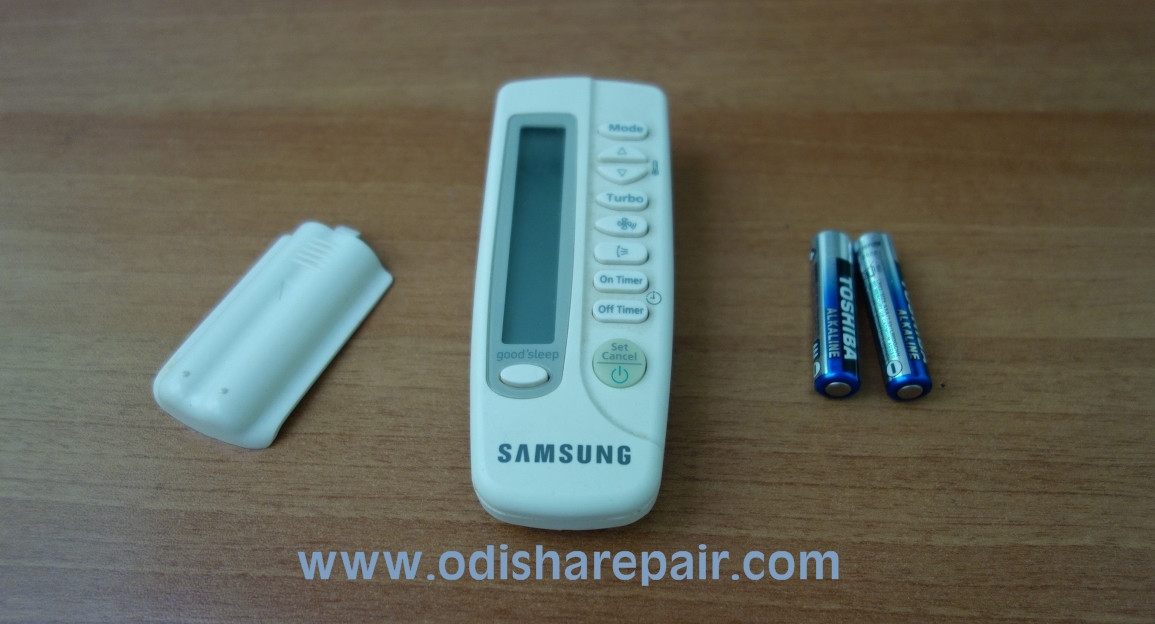
First, check if the display on the remote is working by seeing if you can read the information on it. If not, a simple fix of a battery change will likely solve your issue. To remove the batteries from a split system remote control, simply slide the remote panel down to reveal the other buttons. When it stops, give it an extra tug to slide the panel off completely. The battery compartment will be exposed. Check that the metal components are not corroded and replace the batteries. Double-check the user manual to ensure you are using the correct batteries and also remember to inspect the remote to make sure you insert them the right way round.

If you have another remote in the house that you use for another same brand split air conditioner, you can try it on the unit that’s not working. If the air conditioner responds to this remote, you know that the other one is faulty and needs to be replaced.

The next step is to check the LED light on the top of the remote control. The LED light is responsible for sending signals to the sensor on the interface of the air conditioner unit. If you’ve dropped the remote control, the LED could have detached from other internal components. You will need an infrared sensor card to check if the remote control sends out a signal correctly from the LED.

Another consideration is your proximity to the unit. The remote needs to be within ten metres of the unit to function, and there cannot be furniture or other objects blocking the path of the sensor on the surface of the unit. Clean the sensors to ensure there isn’t any grime on them that’s interfering either.  Another common cause of remote control damage is moisture. Exposure to a spilled drink or other liquids can cause your remote control to stop working.

Check the unit

Another approach to check if your remote is working is to rule out the fact that the unit is responsible for the malfunction.  To do so, press the buttons you’ll find towards the bottom right side of the unit manually to see if they work. If they do, but do not respond to the remote, you can assume the signal from the remote is not reaching the unit or is not being recognised.

, Odisha Repair - AC, Refrigerator & Home Appliances Repair Service in Bhubaneswar , AC, Refrigerator, Washing Machine & Microwave Service Centre Near By In Bhubaneswar
AC repair in Bhubaneswar and Cuttack – Odisha Repair
Perform a reboot of the system

If you’ve ruled out that the remote is faulty, reset the system by turning it off at the main power, and leaving it off for about 30 minutes. If the problem persists once you have turned the power on again, we recommend you book a service so a technician can run a diagnostic check of the system. We may discover that the board inside the indoor unit is not talking to the remote anymore and needs to be replaced. We will also test the remote to see if it is faulty.

You can extend the life of your handheld remote control by ensuring it’s stored in the wall holder that was provided when the system was installed. When replacing a remote control, we recommend you invest in a brand model rather than a generic alternative. Universal remotes may give you the essential functions but are unlikely to offer the full range of features. Faulty (but not damaged) remotes are covered as part of your air conditioner warranty.

Aircon remote not working?

Follow the steps detailed above to confirm your remote, not the aircon system, is at fault. We offer a range of replacement remote controls for air conditioners in our store. You can check the model number (ARC) on the back of the remote. As always it’s best to give us a call and we’ll come out and assist if you can’t get the unit working.

, Odisha Repair - AC, Refrigerator & Home Appliances Repair Service in Bhubaneswar , AC, Refrigerator, Washing Machine & Microwave Service Centre Near By In Bhubaneswar

How do I fix my AC remote?

10 mins to read 10 minutes

Step 1: Test Your Remote With Digital Camera

Check your batteries first or buy new batteries. Once you have good batteries, you can test with a digital camera by pushing the buttons and having camera on and pointing to the infrared led. You should see red light if the remote is working. If no light comes up you obviously have a dead remote but do not despair and proceed to the next step.

Step 2: Open the Remote Control But There Is a Catch or a Few Catches.

Remove the screws if any. Sometimes screws may be hidden under a sticker or rubber feet. Often there are no screws at all but just plastic catches hidden so you have to be clever to open it without breaking the case. Use something blunt and flat toclick the covers open. This is often a challenge but should not be too difficult.

Step 3: Take a Picture of Every Phase So You Remember How to Re-assemble

Since you are using a digital camera you might as well take pictures of the disassembly so re-assemly will be easier.

Step 4: Pull Everything Apart

Did you take a picture of the keyppad layout? Sometimes keypad is just one rubber membrane but sometimes the keys fall away like pieces of a Lego puzzle. And if the buttons are marked with numbers and functions you may struggle to re-assemble them in right order?
Use a small plastic takeaway box or similar to store the bits so you don’t lose parts.

Step 5: Inspect the Circuit Board and Repair Dry Joints

Remotes are often dropped on the floor and may develop dry joints on the battery contacts or circuit board. Inspect the contacts and circuit board under good light with a magnifying lenses or if lucky you might have a microscope or just a very good eyesight? Solder all suspicious joints. If there is a sign of water damage you can use methyl spirits and toothbrush to clean out the circuit board.
Sometimes I have washed the circuit board with soapy warm water, good rinse after that and drying with a hair dryer. I would not recommend the same treatment for you cellphone as some components do not like water.

Step 6: Wash the Covers and the Buttons

Use a small bowl or similar to wash and contain all the parts so you don’t lose bits down the drain. Use old toothbrush to clean all button holes and buttons. Warm water with dish wash liquid does the job. Take particular care with those small buttons and clean them properly. If you can leave the bits to soak overnight they come clean easy. Ultrasonic cleaner would be good for this job but most people do not have one in their cupboard.

Step 7: Rinse, Drain and Dry the Parts

Rinse with warm water. Use a drainer to contain all the parts without losing small bits down the drain. As extra security use sink plug. Dry with a paper towel. Wipe the buttons dry individually as they may still have some dirt which makes them sticky when in use.

Step 8: Repair Case and Re-assemble

If there is damage to the case or buttons you need to do the required repairs. Use hot glue or super glue depending on fault. Let dry overnight if you had to glue something.
Re-assemble bits in reverse order and make sure you have the buttons in right place and right way around. Small nicks and dents on plastic cover can often be repaired by heating carefully with a hair dryer. Do not use a lighter with a flame as it is too easy to burn the plastic. May be you can get rid of some dog bite marks on the remote if they are not too deep?

In case of lost fallen out IR LED you can use second hand LED out of other remote you no longer use or buy one from Electronics hobbyist supplier. Make sure you get the polarity right or you need to get another one.

Step 9: Test With Digital Camera

Test every button as before. Sometimes you have to push two remote buttons simultaneously as with recording buttons on my Panasonic VCR.
Once you have completed test with your camera you can use the remote. That’s it, hope you got it going again?


Frequently Asked Questions Related to AC Remote Repair

Why is my AC remote not working?

First, try replacing the batteries in the remote control. If installing fresh batteries doesn’t solve the problem and you can still operate the air conditioner manually, the remote control might be defective. If you think the remote control is defective, replace it.

How do I fix my AC remote display?

Insert new batteries make sure that the batteries polarities are checked properly refix the battery cover into original position check the remote whether the display is on after pressing.

How do I turn on my AC if the remote is not working?

However if AC remote control doesn’t work what you need to do in that case is keep your finger on the on and off button. And just hold it there for about five to ten seconds.

Can we use Android phone as AC remote?

You can control anything with just a single tap on your mobile screen! … Or, you can make it smart with a smart AC controller or thermostat for ductless Air conditioners!

How can I control my AC temperature without a remote?

If you have an IR on your phone, you can always find on google play store app to control the AC without remote. The cellphone I have is with this option and covers range of electronic appliances which need remote. So MI Remote is the tool to go remote-less literally any where.

How much does an AC remote cost?

AC remote price is depending on the model and brand of the Air Conditioning. The price usually starts from Rs.599/- to Rs.1899/-

What do the symbols on an air conditioner remote mean?

Common Air Conditioning Setting Symbols

The first is the universal symbol that means “Turn on or turn off the machine”, while the Plus and Minus buttons raise or lower ambient temperature. Any snow flake symbol means that the A/C unit will run in Cold mode (i.e. throw out cool air).


Search Tags:

ac remote repair shop near me, ac remote repair near me, how to repair ac remote sensor, voltas ac remote repair, how to repair ac remote control display, is ac remote repairable, ac remote not working, ac remote display not working, voltas ac remote original, universal ac remote, ac remote control online, ac remote control shop near me, ac remote app, voltas ac remote app, universal ac remote price, ac remote shop near me, ac remote repair shop near me, ac remote shop near me, ac remote near me, panasonic ac remote shop near me, AC Repair, Fix AC, AC Troubleshoot, AC Remote Repair in Bhubaneswar, AC remote not working, Bhubaneswar AC Repair, LG AC Remote Repair, Samsung AC Remote Repair, Haier AC Remote Repair, Toshiba AC Remote Repair, Panasonic AC Remote Repair, Mitsubishi AC Remote Repair, OGeneral AC Remote Repair, Toshiba AC Remote Repair, Onida AC Remote Repair, Hitachi AC Remote Repair, AC Compressor Repair, AC Not Cooling, AC Gas Filling, HVAC Technician Near Me, AC Mechanic Near Me in Bhubaneswar, AC Repiar in Sailashree Vihar Bhubaneswar, AC Repair in Saheed Nagar Bhubaneswar, AC Repair in Bapuji Nagar Bhubaneswar, AC Repair in Kalpana Area of Bhubaneswar, AC Repair Near me in Jagamara of Bhubaneswar, AC Repair in Patia Bhubaneswar, Best AC Service Centre Near Me, AC Service Centre


 Book Online Now

Request a Callback

Technician will assist within 30 mins.